
အတည်ပြုခြင်း သင်ခန်းစာ
Verification Tutorial
If you got an active subscription, don't bind any other card or you will lose your current subscription. If you bind any other card, you wont be able to claim your sponsor compensation.
Step 1:
Find the
🔐|verificationchannel direct link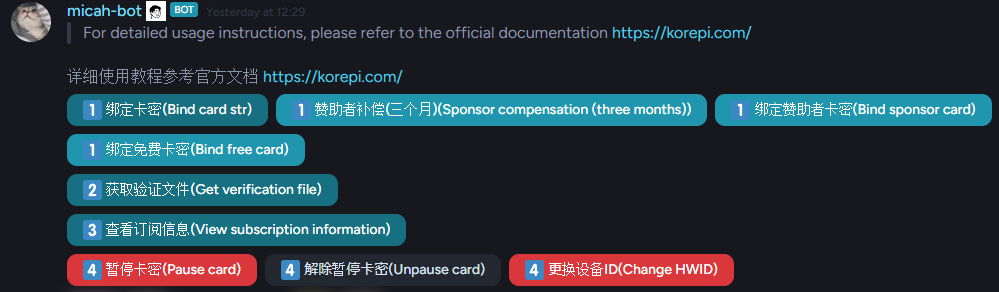
Find the message sent by Micah-bot
Step 2:
For free version follow this link.
If you already got an active subscription, please click on stack card instead, to merge with your current subscription.
If you bought a key from a reseller, click on bind card str and paste in your key.
Step 3:
If you already got a enc.json delete it before opening the program
Click Get Verification File, and you need to fill in your HWID (device ID) obtainable after opening the program once.
- You will get a file from the bot, download it and place it on your korepi folder. Make sure the name is
enc.json.
You can also click View Subscription Information to view your subscription information.
How to pause the key
Click on Pause Card and type YES to pause it. You can unpause it anytime and your subscription will continue.
You can only pause the key once every 30 days
How to change HWID (Device ID)
Click on ID(Change HWID), and paste in the new HWID you get from opening the program, after that download the new file and place it on your Korepi folder.
You can only reset the HWID once every 7 days
MD5 Verification Issue
Each time you obtain the enc.json file again, the previous enc.json file will become invalid.
If the new one is still invalid, please obtain the file again. If it still doesn't work, wait for a while and try again.